
Brat Text Generator — Free Charli XCX Text & Font Maker Online
brat generator
Create your perfect brat aesthetic
Brat Text Generator is a free online tool to create Charli XCX-style text images instantly — no Photoshop, no signup, no watermark. Type your phrase, pick a color, apply effects, and download a watermark-free PNG in seconds.
Choose from brat text white, brat text pink, brat text black, or the original brat green (#8ACE00) — the exact color from Charli XCX’s “Brat” album (Atlantic Records, June 2024). Typography is rendered in Arial Narrow Bold, the authentic brat font style, with full control over size (20–120px), letter spacing (-10 to +20px), and blur (0–10px).
Used by TikTok creators, Instagram users, and Charli XCX fans to make brat-style posts, story highlights, and memes instantly.
What is Brat Text Generator?
Brat Text Generator is a free web tool that lets you create custom images in the style of Charli XCX’s “Brat” album — the 2024 release that defined a global visual aesthetic. Type any short phrase, choose a background color or upload your own image, apply typography effects, and download a watermark-free PNG in seconds.
The tool is built for content creators, TikTok users, Instagram posters, and Charli XCX fans who want brat-style visuals fast — without design skills, Photoshop, or paid subscriptions. No login required. Works on iPhone, Android, and desktop.
Charli XCX Text Generator — Same Tool, Different Search
Our brat text generator is also the most complete free Charli XCX text generator online — the same Arial Narrow Bold font, brat green (#8ACE00), and blur effects that define Charli XCX’s visual identity across “Brat” (2024).
Whether you search “charli xcx text generator,” “charli xcx text maker,” “charli xcx lyrics generator,” or “2026 charli xcx text” — this is the tool. Type any Charli XCX lyric — “360,” “von dutch,” “club classics,” “so julia” — and download instantly.
What makes this brat text generator different from the main brat generator:
- Typography-first — 6 font options, precise size/spacing/blur controls for exact brat text styling
- Color variants — brat text white, pink, black, and green options with independent text color control
- Multi-platform export — Square, Instagram, Story, Facebook — all size-optimized for each platform
- Effects suite — strike lines, glow, shadow, outline, mirror — more control than basic tools
Whether you are making a brat meme, a TikTok thumbnail, a WhatsApp status, a playlist cover, or a brat-style bio image — this generator handles every use case free.
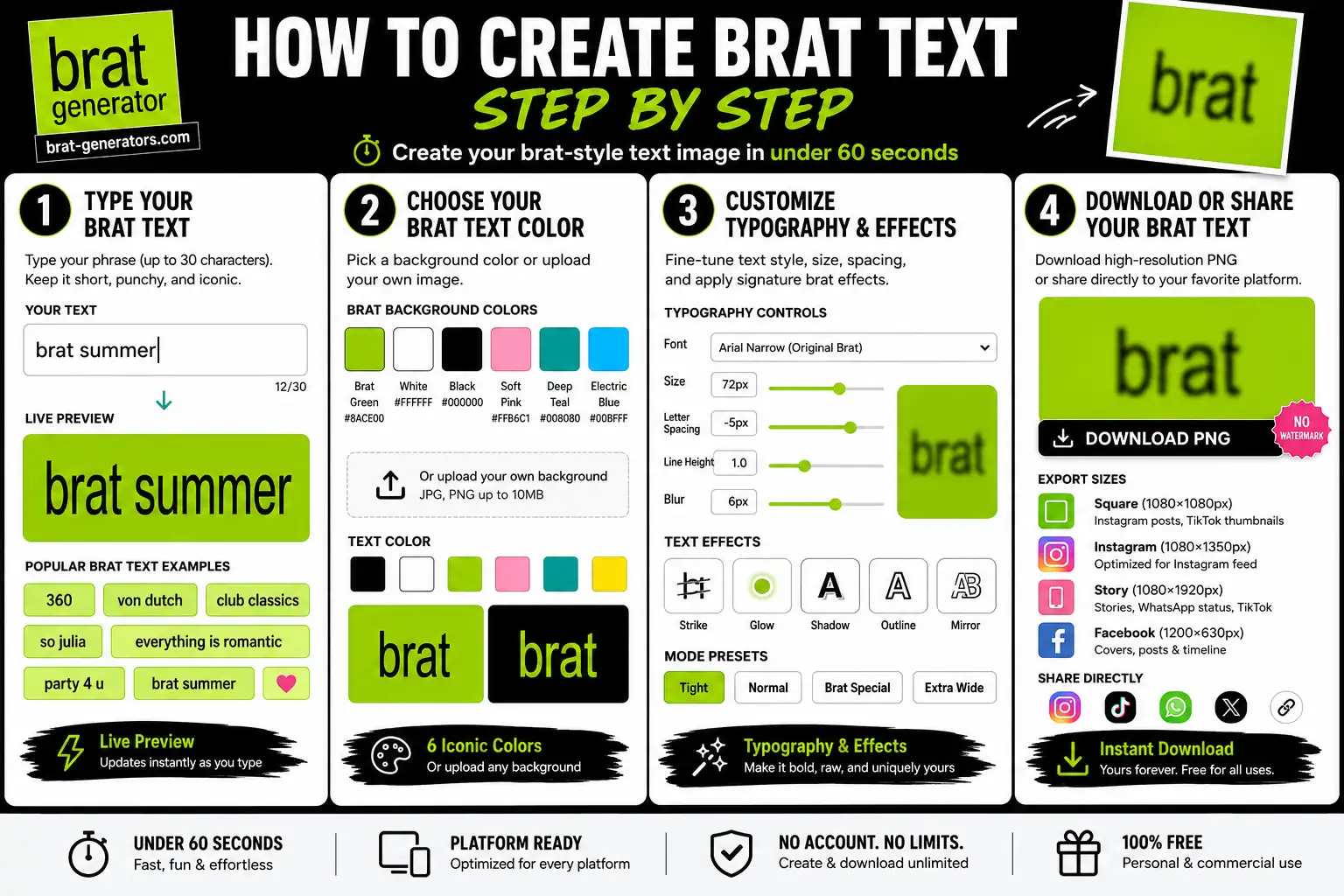
How to Create Brat Text — Step by Step
Creating your first brat-style text image takes under 60 seconds. Here is the exact process from typing your text to downloading a shareable PNG.
Step 1 — Type Your Brat Text
Click the text field and type your phrase — up to 30 characters. Keep it short and punchy, like the track titles on Charli XCX’s
“Brat” album.
Most-used brat text phrases:
- Song titles: “360,” “von dutch,” “club classics,” “so julia,” “everything is romantic,” “party 4 u,” “brat summer”
- Personal: your name, a mood, a caption, an inside joke
- Emojis: supported within the 30-character limit
The live preview updates instantly in Arial Narrow Bold — the authentic brat font — as you type.
Step 2 — Choose Your Brat Text Color
Select your background and text color combination:
Background colors:
- Brat Green (#8ACE00) — the original album color, most authentic brat text green style
- White (#FFFFFF) — clean, high-contrast brat text white
- Black (#000000) — dark mode brat text black style
- Soft Pink (#FFB6C1) — brat text pink, trending for romantic and “So Julia” edits
- Deep Teal (#008080) — editorial and moodboard use
- Electric Blue (#00BFFF) — Club Classics-era vibes
Or upload your own photo as background — the tool auto-fits your image and keeps the brat text legible on top.
Text color adjusts independently — match it to the background for subtle style or contrast for maximum impact.
Step 3 — Customize Typography & Effects
Adjust font, size, spacing, blur, and effects (strike lines, glow, shadow, outline, mirror) using the controls panel. Full list of every option and recommended settings is below in the Features section.
Mode presets: Tight, Normal, Brat Special, Extra Wide — each changes letter spacing and blur combination instantly.
Step 4 — Download or Share Your Brat Text
Choose your export size — Square, Instagram, Story, or Facebook — full dimensions listed in the Features section below.
Brat Text Generator Colors — White, Pink, Black & Green
The color you choose defines the mood of your brat text. Here is a breakdown of every color option and when to use each:
Brat Text White — Most Popular Style
White text (#FFFFFF) on brat green (#8ACE00) background is the exact combination from Charli XCX’s “Brat” album cover. This is the most shared brat text generator white style on TikTok and Instagram. For the most authentic look: white text, brat green background, blur set to 6px.
Brat Text Generator White Background
White background (#FFFFFF) with black or green text creates a clean, high-contrast brat text style — popular for bios, Pinterest pins, and moodboards. Less intense than the green version but equally recognizable.
Brat Text Pink — “So Julia” Aesthetic
Soft pink (#FFB6C1) background with white text captures the romantic, dreamy side of the “Brat” aesthetic — tied to tracks like “So Julia” and “Everything Is Romantic.” Brat text generator pink is the top color choice for love and relationship content on Instagram Stories.
Brat Text Black — Dark Mode Style
Black (#000000) background with white Arial Narrow text creates the high-contrast dark mode brat aesthetic popular for night-out captions, TikTok overlays, and Discord profile pictures. Brat text generator black and brat text generator black background are the top-searched dark variants.
Brat Green Text — Inverse Style
Use #8ACE00 as your text color on a white or black background for the “inverse brat” look. Brat green text generator style is trending in 2026 for creating brat-style watermarks and overlays that sit on top of photos.
Brat Text Transparent Background Export your brat text as a brat text generator transparent PNG — the tool supports transparent background export, letting you layer your text in Canva, Figma, CapCut, or Photoshop on top of any image.
Brat Text Generator for TikTok & Video Content
The most popular use of brat text generator content in 2026 is video — specifically TikTok overlays, Instagram Reels covers, and YouTube Shorts thumbnails.
How to use brat text on video:
Download your brat text PNG from our generator — it exports as a high-resolution transparent or solid background image. Then import it into your video editing app:
- TikTok — upload PNG as a photo layer or use it as a thumbnail. Story export (1080×1920px) is optimized for TikTok full-screen format.
- CapCut — import PNG as an overlay layer on top of your video. Use CapCut’s opacity slider to blend the brat text into your clip.
- Instagram Reels — use Story export for cover image. Square export works for feed preview thumbnail.
- YouTube Shorts — Story export (1080×1920px) matches Shorts aspect ratio exactly.
Most-used brat text for video content in 2026:
- “360” — for loop-style Reels and TikTok transitions
- “brat summer” — for seasonal and lifestyle content
- “von dutch” — for fashion and OOTD videos
- “club classics” — for nightlife and music content
- “everything is romantic” — for relationship and mood content
Brat text generator video tip: Export with brat green background at 5px blur for the most authentic overlay look. Then use your video app’s blend mode (Multiply or Screen) to layer it naturally over footage.
Brat Text Generator Features — Typography, Effects & Export
Our brat text generator gives you full control over every element of the brat aesthetic — from font family and letter spacing to blur level and export format. Here is what is available:
Typography & Spacing Controls
- Font family — 6 options including the authentic Arial Narrow Bold. Full font breakdown and design-tool guides: see our Brat Font Generator.
- Font size — 20px to 120px
- Letter spacing — -10px to +20px
- Line height — 0.8 to 2.0
- Blur level — 0px to 10px (5–7px = authentic album match)
- Mode presets — Tight, Normal, Brat Special, Extra Wide
Text Effects
- Strike lines — thin diagonal crosses, redacted aesthetic
- Glow — neon halo around text
- Shadow — depth for print use
- Outline — clean border around characters
- Mirror — horizontal flip for symmetric designs
Export & Download Options
- Square (1080×1080px) — Instagram, TikTok
- Instagram — feed-optimized ratio
- Story (1080×1920px) — Stories, WhatsApp, TikTok
- Facebook — landscape format
- All exports: watermark-free PNG, high-resolution, transparent background option

Brat Text Ideas — What to Type in 2026
Not sure what to type? Here are the most-used phrases in our brat text generator — pulled from actual Charli XCX tracks, fan culture, and 2025 brat aesthetic trends:
From Charli XCX’s “Brat” Album (June 2024):
- “360” — the opener, perfect for intro content
- “von dutch” — the most-shared brat text phrase globally
- “club classics” — nightlife and music content
- “so julia” — romantic, friendship-dedicated content
- “everything is romantic” — relationship and mood content
- “party 4 u” — celebration and event content
- “brat summer” — seasonal, lifestyle content
- “sympathy is a knife” — emotional, raw content
Brat Aesthetic Phrases (Fan-created, 2024–2026):
- “main character” — self-expression content
- “unbothered” — confidence aesthetic
- “that girl energy” — lifestyle content
- “365 party girl” — celebration content
- “brat and it’s different” — personality content
For Indonesian Fans (Brat Generator Indonesia):
“anomali” (teks anomali) — a separate but hugely popular Indonesian text-effect trend (glitch/distorted style) that frequently overlaps with brat content in the same social circles
Short phrases work best — 1 to 8 words, lowercase, punchy. The brat aesthetic is built on brevity: fewer words, more impact.
Brat Text Generator FAQ
Q: What is brat text?
A: Brat text refers to the typography style from Charli XCX’s “Brat” album (2024) — Arial Narrow Bold font, lowercase, tight letter spacing, and soft Gaussian blur (5–7px) on a flat color background, typically brat green (#8ACE00). Our brat text generator replicates this style free in your browser.
Q: How do I get brat text copy and paste?
A: Our generator produces image-based brat text — type your phrase, download PNG, and share anywhere. For copy-paste text, the brat aesthetic is image-only as it requires the Arial Narrow Bold font and blur effect to render correctly.
Q: How do I make brat text white?
A: In our generator, select white (#FFFFFF) as your text color and brat green (#8ACE00) as the background. This is the exact combination from the original “Brat” album cover. Set blur to 6px for the most authentic look.
Q: Is the brat text generator free?
A: Yes — completely free. No signup, no watermark, no daily limits. Download as many PNG images as you want.
Q: What font is used for brat text?
A: The authentic brat text font is Arial Narrow Bold — a condensed, heavy sans-serif pre-installed on most Windows and Mac devices. Our generator uses this font automatically.
Q: Can I use brat text generator for TikTok?
A: Yes — use the Story export (1080×1920px) for TikTok full- screen format. Export as PNG and import into TikTok as a photo or use in CapCut as a video overlay layer.
Q: What is brat green color code?
A: The brat green hex code is #8ACE00. This is the exact background color from Charli XCX’s “Brat” album cover. Our generator uses this as the default background.
Q: How do I make brat text transparent?
A: Our generator supports transparent background PNG export. Select transparent background in export settings, download your PNG, and layer it in Canva, CapCut, Figma, or Photoshop.
Q: Can I use brat text for commercial use?
A: Yes — typography you create is free for personal and commercial use. The brat aesthetic was popularized by Charli XCX, so credit the culture when appropriate. Do not copy official album artwork directly.
Q: Does brat text generator work on mobile?
A: Yes — fully optimized for iPhone and Android. Touch-friendly sliders, instant live preview, and one-tap PNG download.
Q: What is the difference between brat text generator and brat font generator?
A: Our brat text generator focuses on quick creation with color variants, social media export sizes, and video-ready output. Our brat font generator focuses on typography control — font names, spacing precision, and design tool use (Canva, Figma, Photoshop). Both use Arial Narrow Bold as the base font.
Explore More Free Brat Tools
Our brat text generator is part of a complete suite of free Charli XCX-style creative tools:
- Brat Generator — The original brat image maker. Green background, blur, strike lines, album mode. Best for quick brat-style images.
- Brat Font Generator — Advanced typography: Arial Narrow explained, 6 font options, precise spacing control. Best for designers and font-focused work.
- Brat Meme Generator — Upload any photo and add brat-style text overlay. Best for custom brat memes.
- Brat Emoji Generator — Brat- style emoji stickers for WhatsApp, Telegram, and social media.
- Brat Album Cover Generator — Professional 3000×3000px covers for Spotify and Apple Music.
- Looking for name ideas to style? Check out our Brat Username Ideas list first, then paste your pick in here.
Quick Note on Vibes and Rights We’re huge Charli XCX fans crafting this brat text generator as a tribute to the “Brat” aesthetic—think fan art, not official gear. Your creations? Yours to share or sell as long as they stay original twists (no straight copies of album art). We don’t claim any ties to Charli or her team; this tool’s all about sparking your own neon chaos. Questions? Hit us up.
Last updated: July 2026